
For people who already use Grok Build (SuperGrok or X Premium+), or are about to. You establish camp with Luna Foundry Multiagent, open a dual-pane layout, and run one complete climb—Base Camp → Route → Waypoint → Summit—with proof.
Host: Visual Studio Code or Cursor (both run the extension). Primary ridge: plugin agents + slash skills + a side shell for proof.
Before you start
Confirm each line. If not, finish that item first.
- Luna Foundry Multiagent is installed and enabled (Marketplace or VSIX)—prefer stamp 1.0.26243
- A project folder is open that *is* this climb (workspace root)
- SuperGrok or X Premium+ is active (Grok Build—not free-only chat)
- Command Palette shows Luna: commands (type
Lunato filter) grok --versionworks after install; you can sign in (grok loginif needed)- A few quiet minutes; no secrets in the Grok Build TUI
Commands you will type (Command Palette):
Setup→ Luna: Setup (Copilot / Cursor / Grok)Install / Verify Grok→ Luna: Install / Verify Grok CLIInstall Luna Plugin→ Luna: Install Luna Plugin for GrokGrok Build (bash)or(pwsh)→ Luna: Create Grok Build (bash|pwsh) TerminalGrok (bash)or(pwsh)→ Luna: Create Grok (bash|pwsh) TerminalToggle Grok Keys→ Luna: Toggle Grok Keys (pass-through in Luna terminals)
Use native bash (Git Bash on Windows) or pwsh only. WSL is not supported by Luna.
Step 1 — Establish camp
Open the Command Palette (Ctrl+Shift+P / Cmd+Shift+P). Run these in order.
- Luna: Setup (Copilot / Cursor / Grok)
- If several folders are open, pick the climb root.
- When asked, choose Set up.
- What it does: deploys
.github/(skills + agents), writes.cursorrules, installs/refreshes shell helpers under$HOME/etc(Windows:%USERPROFILE%\etc). - When the summary appears you may see Install Grok Plugin, Grok CLI hub, Open Grok Build (bash) — use them, or finish steps 2–3 below.
- Luna: Install / Verify Grok CLI (if
grokis missing or old).
In a terminal: grok login if needed, then grok --version.
- Luna: Install Luna Plugin for Grok
- This opens a menu, not a silent install. For a first install, pick the option that opens Grok Build and installs the bundled plugin.
- Or from the Setup summary, press Install Grok Plugin.
- Verify in any shell with Grok on PATH:
grok plugin listYou want luna-foundry present, and the install path should match the current extension (not a stale older VSIX path). Skills should include base-camp, route, summit, and macroflow. Agents: Luna, BaseCamp, Route, Summit.
Then open a new terminal so $HOME/etc hooks can load.
If Setup or plugin install fails, fix that before dual-pane. Camp should feel quiet and ready.
Step 2 — Two panes: Grok Build TUI + shell
Both panes live in the editor’s Terminal panel (joined side by side)—not two floating apps.
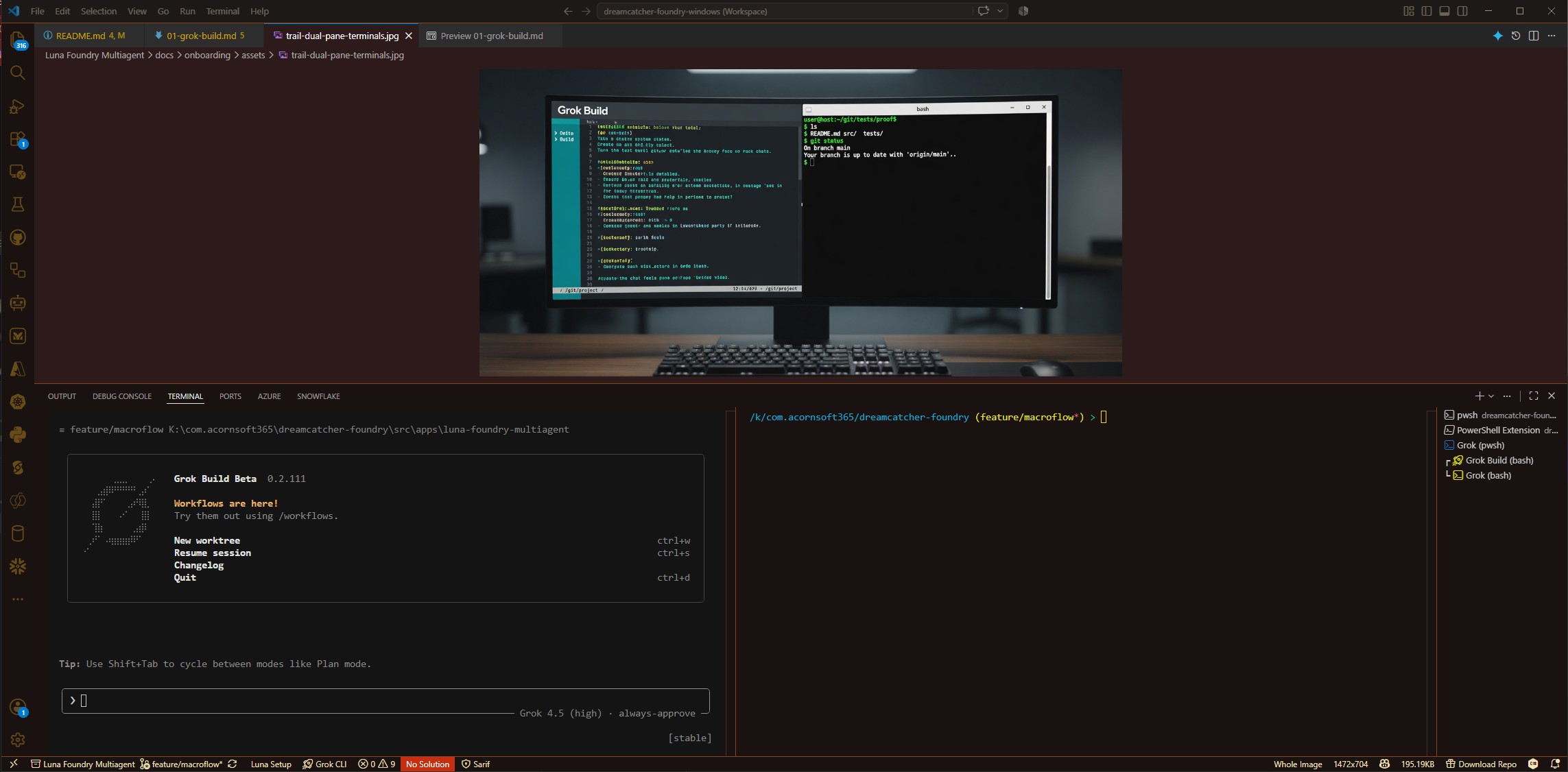
- Left — Grok Build TUI (welcome / agents / chat). Not a plain shell.
- Right — bash or pwsh for
git, tests, proof.
Close-up of the TUI alone:
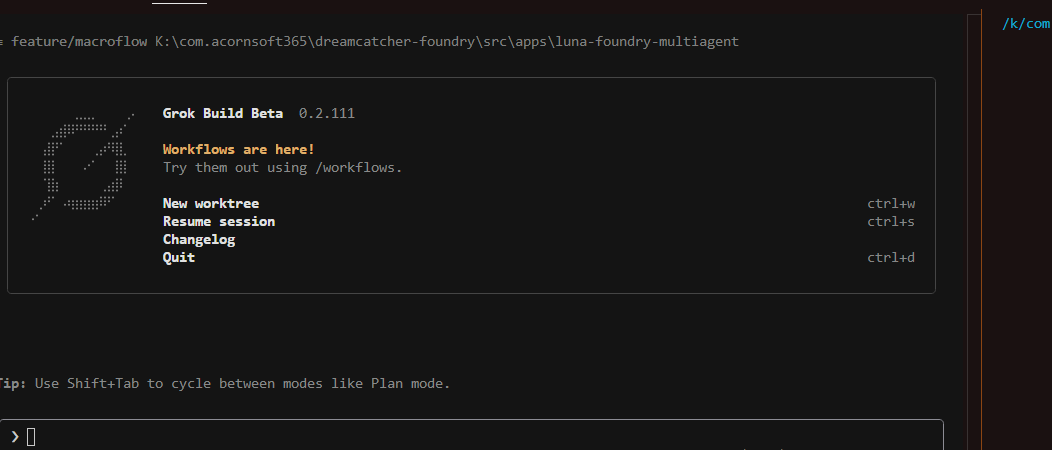
- Run Luna: Create Grok Build (bash) Terminal (or … (pwsh) Terminal). Wait until the Grok Build TUI fills that terminal.
- Run Luna: Create Grok (bash) Terminal (or … (pwsh)) in a second terminal. It must not auto-start the TUI—only a shell prompt with
~/.grok/binon PATH. - Join them: focus a terminal tab → Command Palette → Terminal: Join Terminals → pick the other. Match the picture: TUI left · shell right.
- Optional: Luna: Toggle Grok Keys so chords like voice/
Ctrl+Spacereach the TUI instead of VS Code. See Grok keys in VS Code.
You put the Sherpa’s map (TUI) next to your boots (shell)—in one editor window.
Quick TUI wiring check (30 seconds)
In the Grok Build pane:
/— slash menu opens/skills— pack skills visible/plugins— luna-foundry listed/config-agentsor/agents— Luna four agents listed/base-camp— skill appears or invokes (fallback: plain-text “use the base-camp skill”)
If agents/skills are missing, reinstall the plugin from the current extension, then /new and retry.
Step 3 — One complete climb (product mode)
Send prompts in the Grok Build pane (left). Use the shell pane only for proof. Product mode: skip Azure DevOps and Gnomah vault unless you explicitly opt in. No secrets in the TUI.
Ritual (do not skip Waypoint):
Luna (Sherpa) → Base Camp → Route → Waypoint Check → Summit → proofPhase skills are slash commands when the plugin is loaded:
- Base Camp —
/base-camp— Safe to leave camp? - Route —
/route— Concrete job + done-when marks? - Waypoint — plain text *Waypoint Check* — Hold or go?
- Summit —
/summit— Ship with proof? - Orchestrator —
/macroflowor agent Luna — Who owns the flow?
Multiagent tip: start with agent Luna when you want orchestration; switch to Base Camp / Route / Summit for phase purity—or stay on Luna and let her hand off. Prefer one phase at a time.
3.1 Base Camp
In Grok Build, send:
/base-camp Confirm the luna-foundry pack is present (plugin or workspace). Run product preflight only: shell, gh, grok as needed. Skip ADO and Gnomah vault. Report gaps only. Do not implement product work.Wait for the report. Fix blockers, then continue.
3.2 Route
Pick a smoke job (wiring) or a wish (product feedback).
Smoke job (prove the turn works):
/route Job: produce docs/Analysis/outputs/macroflow-turn-smoke.md with machine name, date, extension version, plugin version, and the exact line "product mode MacroFlow turn OK". Draft title, purpose, 3–5 ACs, out-of-scope (no ADO, no Gnomah required). Interview only if a critical AC is missing. Stop for my Go. Do not implement.Wish climb (skill / feature feedback):
/route Capture one skill or product feature I want in Luna Foundry Multiagent. Interview me one or two questions at a time about pain, skill vs product feature, who benefits, Given/When/Then done, never-do, that I use Grok Build, and how often. Then draft title, purpose, and 3–5 acceptance criteria. Stop for my Go. Do not implement.Answer any questions. When the draft looks right, send:
Go3.3 Waypoint Check
Do not jump straight to Summit. Send:
Waypoint Check: collect phase position, kit readiness, gaps. Report NAB event type or none. For product smoke: WaypointGo is fine if ACs are clear. Hold if ACs are fuzzy.Hold → return to Route. Go → Summit.
3.4 Summit
Smoke job:
/summit For the approved smoke job only: create folders if needed and write docs/Analysis/outputs/macroflow-turn-smoke.md with machine, date, extension version, plugin version, and exact line "product mode MacroFlow turn OK". Verify against ACs. Do not open PRs or post issues. Summarize proof paths.Wish climb:
/summit For the approved wish only: create folders if needed and write docs/Analysis/outputs/luna-wishlist-short-name.md with title, skill-vs-feature, purpose, ACs, never-do, host=Grok Build, and frequency. Do not open a PR and do not post an issue for me.3.5 Prove it (shell pane)
In the bash (or pwsh) terminal:
git status
# or:
ls docs/Analysis/outputs
# pwsh: Get-ChildItem docs/Analysis/outputs
If the folder is not a git repo, listing the outputs folder is enough to show the file landed.
3.6 Optional: /goal across turns
When goal mode is available in your Grok Build session:
/goal Complete product-mode MacroFlow: Base Camp → Route → Waypoint → Summit for this climb with proof
/goal status
/goal stacks with MacroFlow—it does not replace Base Camp / Route / Summit. Clear when done: /goal clear.
3.7 File feedback (wish climb only)
Keep the wish brief from Summit in this workspace (no secrets). Then send a Climb Note if you want it on this site. No GitHub required.
Done.
How the rope team should feel
- Announce Phase · Skill so a human can join mid-trail — do not dump every skill on turn one
- One job per Route; proof at Summit
- Use the side shell for
gh/azauth and secrets — never paste PATs into the TUI - Luna orchestrates; specialists only when they shorten the path
- Match plugin/extension stamp after upgrades
CLI alternatives (outside TUI, useful for quick checks):
grok --agent Luna -p "Announce phase and next MacroFlow step only."
grok --agent BaseCamp -p "Product preflight only. Skip ADO and Gnomah. Gaps only."
All trails · Security · Grok keys · Support